Getting Started with MCP Servers - Beginner Guide
The way we interact with AI assistants is evolving rapidly.
If you've heard about MCP servers but aren't sure where to begin, you're in the right place. This comprehensive guide breaks down everything you need to know about Model Context Protocol servers, why they matter, and how to start using them today. What is MCP (Model Context Protocol)?
Model Context Protocol, commonly known as MCP, is an open standard that enables AI assistants to interact with external services, tools, and data sources. Think of MCP as a universal translator that allows your AI to communicate with the outside world beyond its training data.
Before MCP, AI assistants operated in isolation. They could only access information they were trained on, limiting their usefulness for real-time tasks. MCP changes this by creating a standardized way for AI models to connect with databases, APIs, file systems, and countless other services.
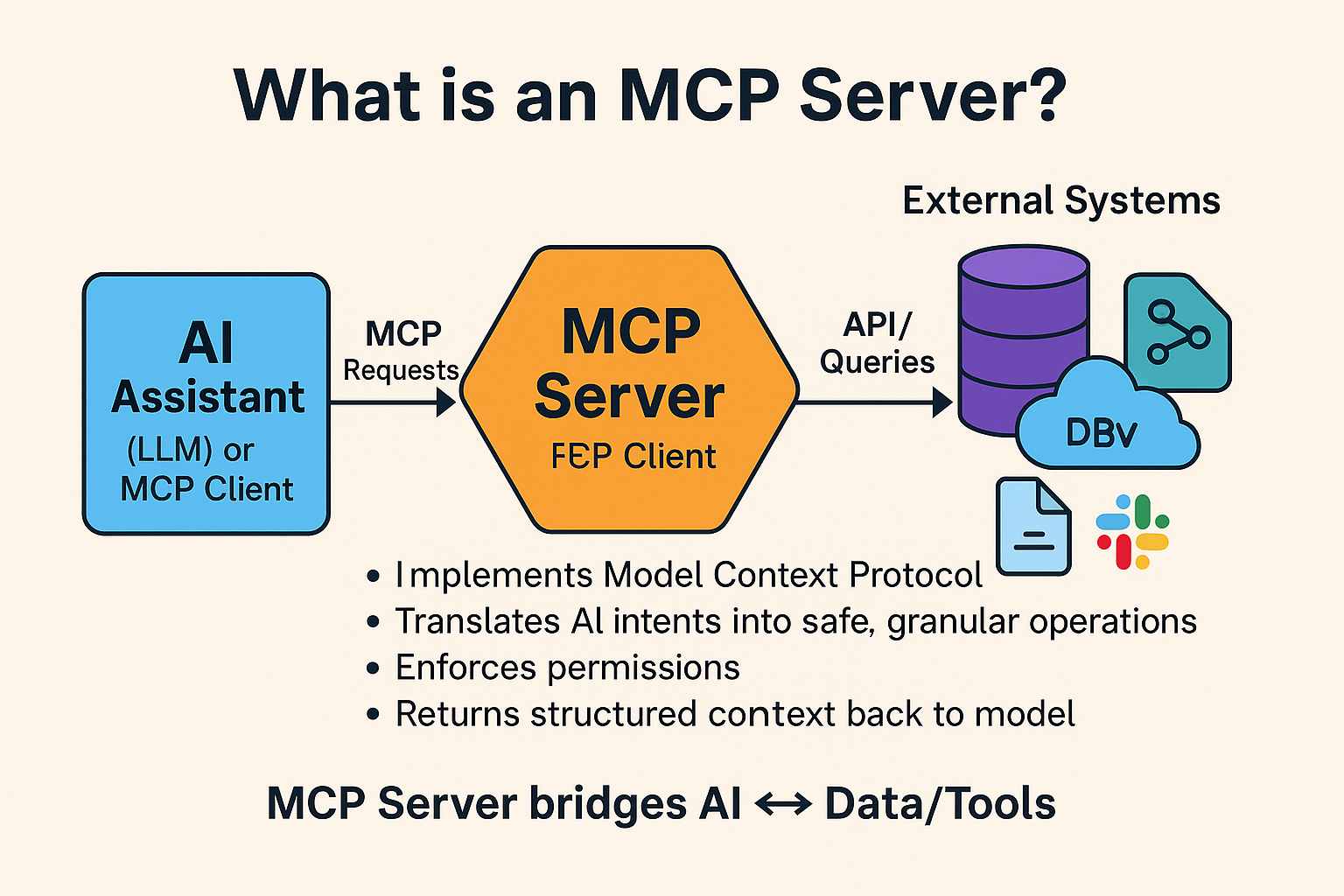
In simple terms, MCP servers act as bridges between your AI assistant and external tools. When you connect an MCP server to your AI, you're essentially giving it new capabilities it didn't have before.
Why MCP Servers Matter for AI Users
Understanding the importance of MCP servers helps you appreciate their potential. Here's why they're transforming how people use AI assistants. Extended Functionality
Without MCP, your AI assistant is limited to generating text based on its training. With MCP servers, your assistant can perform actions like searching databases, managing files, querying APIs, and interacting with third-party applications. This transforms a conversational AI into a powerful productivity tool.
Real-Time Data Access
MCP servers enable AI assistants to fetch current information rather than relying solely on potentially outdated training data. Whether you need today's weather, current stock prices, or the latest news, MCP connections make real-time data retrieval possible.
Workflow Automation
By connecting multiple MCP servers, you can create sophisticated workflows. Imagine asking your AI to pull data from a spreadsheet, analyze it, and then send a summary via email. MCP makes these multi-step automations achievable without writing complex code.
How MCP Servers Work
Understanding the basic architecture helps demystify MCP servers. The protocol operates on a client-server model with three main components. The Host Application
This is typically your AI assistant interface, such as Claude Desktop or another MCP-compatible application. The host manages connections to MCP servers and coordinates communication between the user and various services.
MCP Servers
These are lightweight programs that expose specific capabilities to the AI. Each server specializes in particular functions. For example, one server might handle file operations while another manages database queries. Servers communicate using the standardized MCP protocol, ensuring compatibility across different implementations.
The Protocol Layer
MCP defines how messages are formatted and exchanged between hosts and servers. This standardization means any MCP-compatible server works with any MCP-compatible host, creating a flexible ecosystem of interoperable tools.
Finding MCP Servers: The Antigravity AI Directory
One challenge beginners face is discovering which MCP servers are available and which ones suit their needs. This is where curated directories become invaluable. The Antigravity AI Directory provides a comprehensive catalog of MCP servers organized by category and use case. Whether you're looking for development tools, productivity enhancers, or data integration solutions, the directory helps you find exactly what you need.
Browsing the directory at antigravityai.directory/mcp lets you explore servers for file management, API integrations, database connections, and much more. Each listing typically includes descriptions, setup instructions, and compatibility information, making it easier for beginners to get started.
Setting Up Your First MCP Server
Ready to dive in? Here's a step-by-step approach to connecting your first MCP server.
Step 1: Choose a Compatible Host First, ensure you have an MCP-compatible application installed. Claude Desktop is a popular choice that supports MCP connections natively. Download and install your preferred host application before proceeding.
Step 2: Select an MCP Server Visit antigravityai.directory/mcp and browse available servers. For beginners, start with something simple like a file system server or a basic utility server. Look for servers marked as beginner-friendly or those with straightforward setup processes.
Step 3: Install the Server Most MCP servers are distributed as packages that you install via package managers. Common installation methods include npm for JavaScript-based servers or pip for Python servers. Follow the specific installation instructions provided with your chosen server.
Step 4: Configure the Connection After installation, you need to configure your host application to recognize the server. This typically involves editing a configuration file to specify the server's location and any required parameters. Configuration formats vary by host, so consult your application's documentation.
Step 5: Test the Connection Once configured, restart your host application and test the connection. Try a simple command that uses your new server's capabilities. If everything is set up correctly, your AI assistant should now have access to the server's features. Best Practices for MCP Beginners
Following these guidelines will help you avoid common pitfalls and get the most from MCP servers. Start Simple Resist the temptation to install dozens of servers at once. Begin with one or two that address your immediate needs. Once comfortable, gradually expand your toolkit. Read Documentation Thoroughly Each MCP server has unique requirements and capabilities. Taking time to read documentation prevents configuration errors and helps you understand what's possible with each server.
Keep Security in Mind
MCP servers can access sensitive systems and data. Only install servers from trusted sources, and be mindful of the permissions you grant. Review what each server can access before connecting it to your AI assistant. Stay Updated
The MCP ecosystem evolves quickly. Periodically check directories like antigravityai.directory/mcp for new servers and updates to existing ones. Keeping your servers current ensures you benefit from improvements and security patches. Common Use Cases for MCP Servers Understanding practical applications helps you identify which servers might benefit your workflow.
Development and Coding Developers use MCP servers to give AI assistants access to code repositories, documentation, and development tools. This enables tasks like code review, documentation generation, and automated testing assistance. Data Analysis
Connecting database and spreadsheet servers allows AI assistants to query data, generate reports, and perform analysis without manual data export and import. Content Management
Writers and marketers use MCP servers to connect AI assistants with content management systems, enabling streamlined content creation and publishing workflows. Personal Productivity
From email management to calendar integration, MCP servers help individuals automate routine tasks and manage information more efficiently. The Future of MCP
Model Context Protocol represents a significant step toward more capable and useful AI assistants. As the ecosystem matures, expect to see more sophisticated servers, better tooling, and broader adoption across AI platforms. For beginners starting today, the learning curve is manageable and the rewards are substantial. By understanding MCP fundamentals and leveraging resources like the Antigravity AI Directory, you position yourself to take full advantage of this powerful technology.
Getting Started Today
The best way to learn MCP is through hands-on experience. Visit antigravityai.directory/mcp to explore available servers, choose one that interests you, and follow the setup process. Within minutes, you can extend your AI assistant's capabilities in meaningful ways.
MCP servers are democratizing access to powerful AI integrations. Whether you're a developer seeking to enhance your workflow or a curious beginner exploring AI possibilities, MCP provides the foundation for a more connected and capable AI experience.