Find the Perfect MCP Server - Complete Guide 2024
How to Find the Perfect MCP Server on Antigravity AI Directory
Understanding MCP Servers
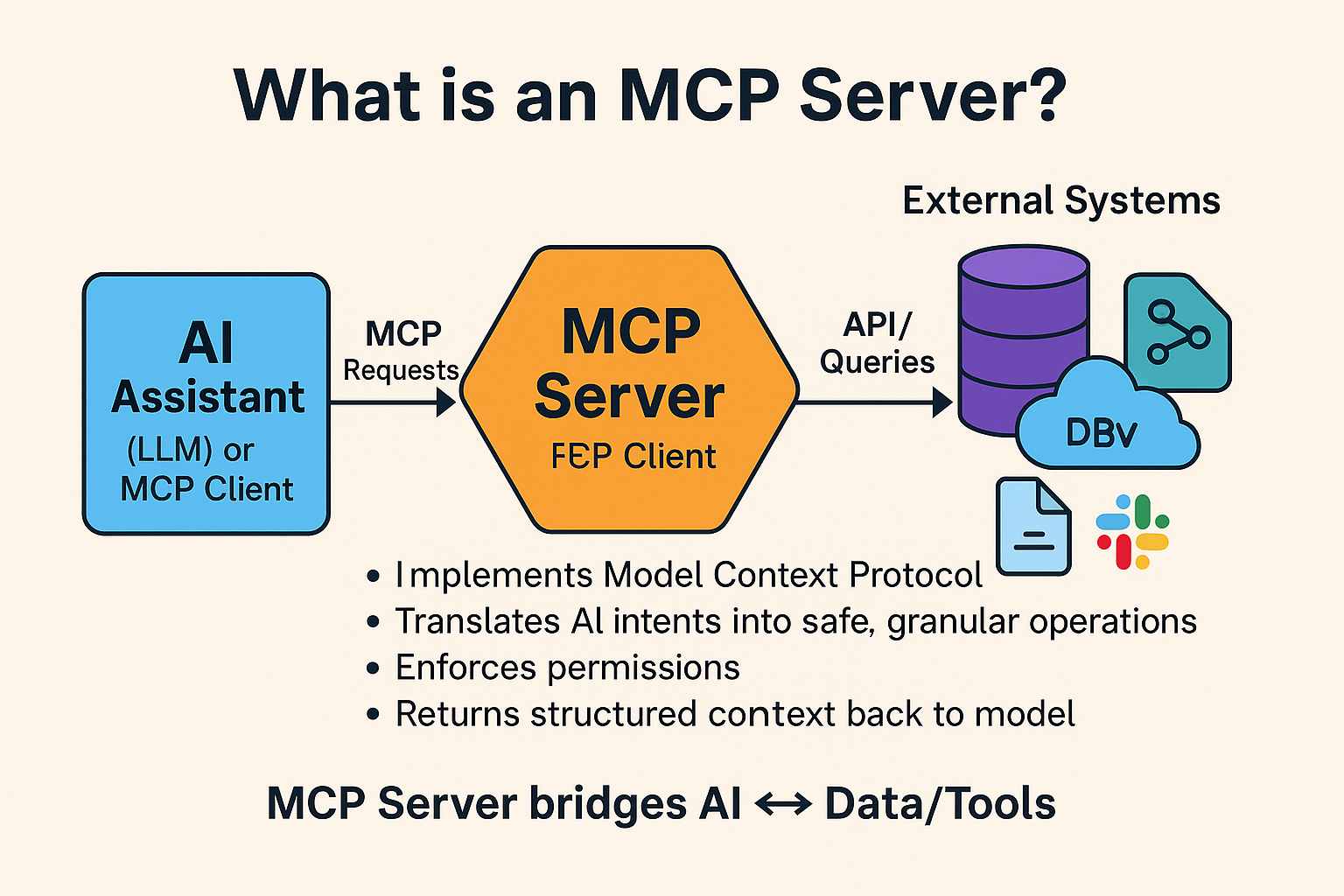
Model Context Protocol (MCP) servers extend your AI assistant beyond text generation. They provide direct access to:
- 🗄️ Databases (PostgreSQL, MongoDB, Redis)
- 🔧 APIs (GitHub, Stripe, Slack)
- ☁️ Cloud services (AWS, Vercel, Supabase)
- 🛠️ Development tools (Figma, Linear, Notion)
Your AI can now execute actions, not just suggest code.
The Discovery Problem
Finding quality MCP servers is challenging:
❌ Documentation scattered across GitHub repos
❌ Unclear setup instructions
❌ Unknown reliability
❌ Difficult to compare options
❌ No central directory
Solution: Antigravity AI Directory's curated collection of 69 servers.
Step-by-Step Selection Guide
Step 1: Browse by Category
Visit antigravityai.directory/mcp and explore categories:
Database Servers (9 total)
- MongoDB - NoSQL operations
- Supabase - All-in-one backend
- PostgreSQL - Relational DB
- Redis - Caching layer
- Prisma - Type-safe ORM
- Neon - Serverless Postgres
- Pinecone - Vector database
Development Tools (12 total)
- GitHub - Repository management
- GitLab - CI/CD pipelines
- Linear - Issue tracking
- Atlassian - Jira & Confluence
- Notion - Documentation
- Figma - Design-to-code
Cloud & Deployment (8 total)
- AWS S3 - Object storage
- Vercel - Next.js hosting
- Netlify - JAMstack sites
- Heroku - PaaS platform
Communication (6 total)
- Slack - Team messaging
- Discord - Community chat
- SendGrid - Email delivery
- Twilio - SMS & voice
AI & Search (5 total)
- Pinecone - Vector search
- Algolia - Search API
- Elasticsearch - Full-text
- Perplexity - AI search
Step 2: Evaluate Options
Compare servers based on:
- ⭐ Stars - Community popularity
- 📝 Description - Use case fit
- ⚙️ Complexity - Setup difficulty
- 🔑 Requirements - API keys needed
Step 3: Review Documentation
Click any server to see:
- Detailed description
- Configuration template
- Environment variables
- Installation steps
- Example usage
Step 4: Copy Configuration
One-click copy to clipboard:
{
  "mcpServers": {
    "supabase": {
      "command": "npx",
      "args": ["-y", "@supabase/mcp-server"],
      "env": {
        "SUPABASE_URL": "https://your-project.supabase.co",
        "SUPABASE_KEY": "your-anon-key"
      }
    }
  }
}
Step 5: Install & Test
- Add to your AI config file
- Set environment variables
- Restart AI assistant
- Test with a prompt!
Featured Servers Deep Dive
🐙 GitHub MCP Server
Perfect for:
- Repository management
- Pull request reviews
- Issue tracking
- CI/CD automation
Setup:
{
  "github": {
    "command": "npx",
    "args": ["-y", "@modelcontextprotocol/server-github"],
    "env": {
      "GITHUB_PERSONAL_ACCESS_TOKEN": "ghp_xxxxx"
    }
  }
}
Example prompt:
"List all open PRs in my repository with more than 2 comments"
⚡ Supabase MCP Server
Perfect for:
- Database queries
- User authentication
- File storage
- Real-time subscriptions
Example prompt:
"Fetch all users where reputation > 100 ordered by created_at DESC"
💳 Stripe MCP Server
Perfect for:
- Payment processing
- Subscription management
- Customer billing
- Refund handling
Example prompt:
"Create a checkout session for the Pro plan at $29/month"
Pro Tips for Success
1. Start Read-Only
Use read permissions first. Test thoroughly before granting write access.
2. Use Environment Variables
Never hardcode credentials:
# .env
GITHUB_TOKEN=ghp_xxxxx
STRIPE_KEY=sk_test_xxxxx
3. Test in Development
Use sandbox/test API keys before production.
4. Combine Multiple Servers
Full-stack example:
- Supabase (database)
- Stripe (payments)
- SendGrid (emails)
- Vercel (deployment)
5. Monitor Rate Limits
Be aware of API limits when using servers frequently.
Common Use Cases
SaaS Application Stack
- Supabase - Database & auth
- Stripe - Payment processing
- SendGrid - Transactional emails
- Vercel - Deployment & hosting
DevOps Automation Stack
- GitHub - Code management
- Vercel - Auto-deployments
- DataDog - Monitoring
- Sentry - Error tracking
Content Platform Stack
- Notion - Content management
- Cloudinary - Media optimization
- Algolia - Search functionality
- Netlify - Static hosting
Troubleshooting Guide
Issue: Server Not Found
Solution: Verify package name spelling and availability
Issue: Authentication Failed
Solution: Double-check API keys and environment variables
Issue: Rate Limited
Solution: Implement request throttling or upgrade API plan
Issue: Permission Denied
Solution: Verify token has required scopes
Next Steps
Ready to supercharge your AI workflows?
👉 Browse All 69 MCP Servers
👉 Filter by Category
👉 Submit Your Configuration
Build faster with the right tools.
Explore MCP servers at antigravityai.directory/mcp